
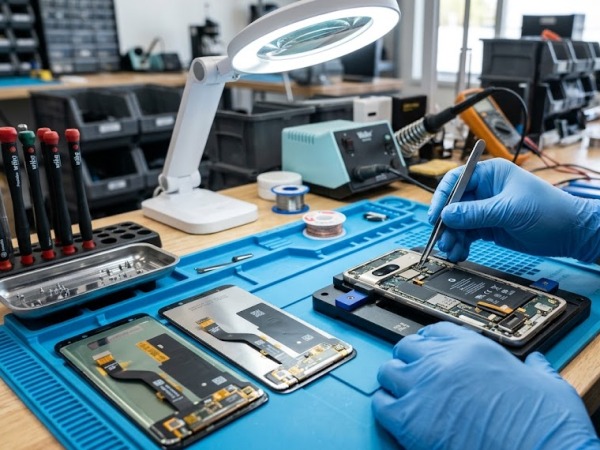
It happens in a fraction of a second. A slip of the fingers, a hard drop onto concrete, and your daily driver is suddenly looking back at you with a spiderweb pattern of cracked glass. Once the initial panic subsides, you face a critical decision that will dictate how your device performs for the rest of its lifecycle: Should you opt for an OEM (Original Equipment Manufacturer) replacement, or save a few bucks with an aftermarket part?
In our repair workshop, we deal with this exact dilemma multiple times a day. Smartphone owners across the United States and Canada are flooded with conflicting advice online. Some claim aftermarket parts are a cheap trap that will ruin your device, while others swear they provide identical performance for a fraction of the cost.
The truth isn’t black and white. Navigating the world of smartphone hardware components requires understanding exactly what you are paying for, how your phone’s operating system handles hardware changes, and what the long-term trade-offs mean for your pocket. This deep-dive guide pulls back the curtain on the smartphone repair industry to give you a definitive breakdown of OEM versus aftermarket parts.
Key Takeaways at a Glance
| Feature/Metric | OEM (Original Equipment Manufacturer) Parts | Aftermarket (Third-Party) Parts |
| Source | The original brand factory (e.g., Apple, Samsung) | Independent third-party manufacturers |
| Cost | Premium pricing (usually 30% to 60% higher) | Budget-friendly (significant cost savings) |
| Component Quality | Match exact original factory specifications | Variable (ranges from premium grade to low-quality copy) |
| Display & Color Accuracies | 100% accurate colors, brightness, and refresh rates | Color temperature may vary; potential lower peak brightness |
| OS Compatibility | Seamless integration without system warning alerts | May trigger persistent OS warning flags (e.g., “Unknown Part”) |
| Warranty Coverage | Backed by manufacturer or certified shops | Varies by repair shop; parts carry no factory backing |
1. Demystifying the Terms: What Do OEM and Aftermarket Actually Mean?
To make an educated choice, you must understand exactly how the smartphone supply chain handles replacement components.
What is an OEM Part?
An OEM part stands for Original Equipment Manufacturer. If you own an iPhone or a Samsung Galaxy, an OEM replacement component is built either by that specific tech giant or by their authorized contract manufacturers (like Foxconn or TSMC) using identical blueprints, raw materials, and strict quality control standards.
When a technician installs a true OEM component, your smartphone cannot tell the difference between the factory-assembled hardware and the newly installed replacement. It retains exactly the same structural strength, chemical composition, color calibration, and energy efficiency profile as it had the day you unboxed it.
What is an Aftermarket Part?
An aftermarket part is built by independent companies that have no official affiliation with the original device manufacturer. These third-party companies reverse-engineer the original smartphone hardware to build their own functional duplicates.
It is completely wrong to assume that all aftermarket parts are trash. The third-party market is massive and highly segmented, breaking down into distinct quality tiers:
- Premium Aftermarket (Refurbished/Premium Grade): These often use original components combined with premium third-party glass or recycled components. They match OEM specifications very closely.
- Medium Grade (Standard Copy): These are functional and safe but feature noticeable compromises, such as slightly higher power consumption, thicker bezels, or distinct color variations.
- Low-Grade Copies: Frequently made with cheap liquid crystal architectures (like low-end LCDs swapped for native OLEDs) that compromise touch sensitivity and degrade quickly.
2. The Battle of the Screens: Display Differences Explored
For most smartphone users, a cracked glass screen or a bleeding display panel is the primary reason to seek out repair work. When choosing between OEM vs. aftermarket for a display replacement, you are looking at substantial differences in day-to-day visual performance.
Panel Architecture: OLED vs. LCD Copies
High-end modern flagship devices use OLED (Organic Light Emitting Diode) panels. These displays turn off individual pixels to achieve true, deep blacks and maintain vibrant contrast ratios.
Workshop Insight: A major trap in budget aftermarket screen repairs is switching screen technologies. To hit ultra-low price tags, cheap aftermarket screen assemblies often swap out an expensive OLED panel for a cheaper LCD (Liquid Crystal Display) module.
If you unknowingly accept an LCD aftermarket swap on a device built for an OLED, you will instantly spot a few frustrating side effects:
- Drained Battery Life: LCDs require a continuous backlight to illuminate pixels, significantly increasing power draw.
- Washy Aesthetics: Blacks appear dark gray, and colors lose their punchy pop.
- Thicker Bezel Profiles: LCD modules are physically thicker than OLEDs, which means the replacement screen might sit slightly proud of your smartphone’s midframe, leaving it highly susceptible to shattering on its next drop.
Color Profiles, Brightness, and Touch Latency
Even premium third-party aftermarket screens can exhibit slight calibration differences. OEM screens undergo rigorous factory-level color profiling, ensuring exact compliance with digital display standards like DCI-P3. An aftermarket alternative may lean slightly cool (a bluish tint) or warm (a yellowish tint). Furthermore, peak sunlight readability can drop by several hundred nits on a low-to-medium-tier aftermarket screen, making it incredibly hard to view text when outdoors on a bright day.
Touch sensitivity is another major factor. True OEM digitizers track touches flawlessly at high refresh rates. Sub-par third-party screens can occasionally suffer from minor touch latency or stuttering, transforming smooth typing experiences into a daily exercise in typos.
3. Beyond the Screen: Batteries and Internal Assemblies
While screens are highly visible, internal parts like batteries and charging ports carry critical safety considerations.
Battery Lifespans and Chemical Safety
Lithium-ion batteries are dense energy cells. A certified OEM battery is built with precise overcharge protection circuit matrices, exact micro-milled cell dimensions, and highly stable chemical formulations.
[OEM Battery Safety Integration]
Factory Cell Architecture ──> Built-in Thermal Protection ──> Stable Power Delivery
                                                                    │
                                                                    ▼
                                                        No OS Battery Degradation Warnings
Premium aftermarket batteries from recognizable, trusted third-party peripheral manufacturers can perform phenomenally. However, opting for a bottom-tier, unbranded aftermarket battery exposes your device to rapid capacity degradation, thermal spikes, or swelling that can warp your inner circuitry or pop your back glass off the chassis.
Charging Ports and Flexible Printed Circuits (FPC)
A broken charging assembly is another common point of failure. The flat flexible ribbon cables linking your USB-C or Lightning port to your logic board contain vital trace lines for microphones, cellular antennae, and fast-charging power conduits.
Aftermarket charging flex cables can sometimes suffer from cut corners in shielding. In our repair experience, installing a cheap aftermarket charging port flex can occasionally lead to weak cell signal reception or disable your phone’s fast-charging capabilities.
4. Software Locks: How Apple and Samsung Handle Non-OEM Repairs
If you own a modern smartphone, you cannot ignore the impact of software locks and digital right-to-repair architecture. Over the last several years, top-tier manufacturers have systematically paired specific serial numbers on individual components directly to the main system motherboard.
The “Unknown Part” Message
When you swap an aftermarket display or battery into a modern iPhone or Samsung Galaxy without specialized calibration software provided by the manufacturer’s network, your operating system will detect a component mismatch.
[Component Diagnostic Test]
System detects component serial change ──> Cannot verify manufacturer cryptographic signature ──> Generates persistent "Unknown Part" system notification
Even if the aftermarket component is functioning perfectly, your phone will surface a persistent notification within your main settings panel stating that the device is “Unable to verify this component.”
Feature Drop-offs
Choosing non-authorized aftermarket parts can sometimes strip away secondary software functions. On Apple devices, swapping to a standard aftermarket screen without transferring the original ambient light sensor or reprograming the serial data chip can cause you to lose access to True Tone auto-color adjustments. On older devices, unverified components can occasionally lead to the outright disabling of biometric validation systems like Face ID or Touch ID for security purposes.
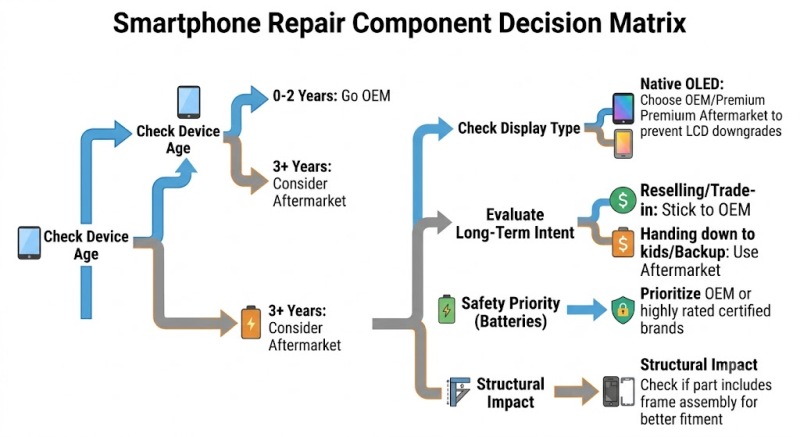
5. Decision Framework: When to Choose OEM vs. Aftermarket
To help guide your choice, look at your repair path through the lens of your device’s current value and your own usage habits.
Choose OEM Components If:
- You own a brand-new flagship phone: If your phone is less than two years old and is a premium flagship tier, spending the extra cash to keep it entirely original protects its overall asset value.
- You plan to trade your device in or sell it: Major network providers in the USA and Canada inspect trade-ins closely. Persistent software errors or off-color displays drastically reduce your trade-in value.
- You require exact color accuracy: If you are a mobile photographer, digital artist, or video producer, the perfect color staging of an OEM panel is non-negotiable.
Choose Aftermarket Components If:
- You are repairing an older or budget device: Spending premium OEM money to fix a four-year-old backup device worth less than $200 makes little financial sense. A mid-tier aftermarket screen keeps the device highly usable at an appropriate price point.
- You want maximum cost savings: If budget constraints are your main priority and you are perfectly okay with minor cosmetic variations or an annoying setting notification box, premium aftermarket parts get you back up and running affordably.
.
Frequently Asked Questions (FAQ)
1. Will an aftermarket screen repair void my phone’s manufacturer warranty?
Under the Magnuson-Moss Warranty Act in the United States, a manufacturer cannot legally void your entire device warranty simply because a third-party repair part was used. However, if the aftermarket component itself fails or causes damage to other internal parts of the smartphone (like a faulty battery shorting out the motherboard), the manufacturer is not responsible for covering those specific repairs under warranty.
2. Can a software update break my phone if it has aftermarket parts?
Historically, major operating system updates have occasionally caused temporary touch issues on devices with uncertified aftermarket screens. Reputable aftermarket manufacturers quickly update their component chips to restore compatibility, but choosing high-quality parts lowers the risk of structural software update conflicts.
3. What is a “Refurbished OEM” screen?
A refurbished OEM screen is an excellent middle ground. It is an original factory display that previously had cracked outer glass. A specialized recycling technician uses precision machinery to separate the broken glass away, preserving the pristine original underlying OLED/LCD panel, and fuses a brand-new top layer of glass over it. It offers 100% OEM display characteristics at a reduced cost.
4. Why does my phone say “Important Battery Message” after an aftermarket swap?
This is your phone’s built-in operating system security architecture signaling that the unique cryptographic ID chip on the new battery doesn’t match the original factory record. Unless the battery is calibrated via official diagnostic channels, this notification is standard behavior and does not automatically mean the battery is unsafe.
Conclusion: Get Your Device Fixed Right
Selecting between OEM and aftermarket components isn’t about finding a single right answer; it’s about making a calculated choice that aligns with your specific budget, smartphone model, and expectations. Whichever path you choose, the absolute most critical factor is the expertise and transparency of the repair team opening up your phone. High-quality work requires specialized anti-static workstations, exact torque calibration tools, and proper replacement seals to preserve your phone’s internal dust and water resistance.
If you are located in the United States or Canada and need an elite-tier team to bring your device back to life, turn to the experts at Phonebulance.com. Backed by over 500+ glowing reviews on Yelp and Google Business, Phonebulance delivers top-flight smartphone repair services with unmatched diagnostic accuracy, fully transparent part grading, and robust parts guarantees. Don’t leave your essential daily driver to chance—reach out to Phonebulance.com today to secure an upfront quote and book a professional, stress-free restoration.
Make Appointment Now!
Expert Review Verification Box
This comprehensive guide was compiled, cross-reviewed, and verified by our senior smartphone hardware diagnostic specialists. With over a decade of hands-on technical workshop bench experience managing thousands of micro-soldering component restorations, device screen extractions, and critical battery swaps, our team is dedicated to empowering consumers with truthful, technical, and actionable device intelligence.

Phonebulance is your one-stop center for all things smartphone! Whether you’ve cracked your screen, dropped it in water, or it’s simply acting sluggish, our certified technicians can diagnose and fix a wide range of issues.
Contact us today or make an online appointment to learn more about our services and keep your smartphone connected and functioning like new!
Here is the list of our smartphone repair services:
- Apple iPhone
- Apple Watch
- Apple iPad
- Apple iPod
- Samsung Galaxy S Series
- Samsung Galaxy Note Series
- Samsung Galaxy Tab
- Google Pixel and Nexus
- OnePlus
- Other brands (LG, Motorola, HTC, Blackberry…)
Here is the list of our repair and fixing prices:
- iPhone LCD Screen Replacement
- iPhone Charging Port Replacement
- iPhone Battery Replacement (High Capacity)
- iPad Screen Replacement
- iPhone Back Camera Lens Replacement
- iPhone Rear Camera Repair
- iPhone Back Glass Repair Cost
Service Areas in Orange County South:
0 Comments