
You press the power button, but the screen stays black. You plug it into your charger, and… nothing. In that moment, a sinking feeling sets in. Is it just a dead battery, or is it something far worse?
For many iPhone owners in California, from the tech hubs of Silicon Valley to the busy streets of Los Angeles, our phones aren’t just devices—they are our mobile offices, our photo albums, and our primary connection to the world. When an iPhone motherboard (also known as the logic board) fails, it can feel like your digital life has been locked in a vault with no key.
The good news? A “dead” motherboard doesn’t always mean your data is gone forever. In this guide, we will walk through the telltale signs of motherboard failure, how to distinguish it from simpler issues, and the exact steps you can take to recover your precious memories and files.
Key Takeaways at a Glance
| Symptom | Potential Cause | Data Recovery Likelihood |
| No Power / Black Screen | Short circuit on the logic board | High (with professional microsoldering) |
| Boot Loop (Apple Logo) | NAND (Storage) issues or CPU desoldering | Moderate (requires advanced board work) |
| Overheating While Idle | Faulty Power Management IC (PMIC) | High (if addressed quickly) |
| Random Restarts | Trace damage or aging components | High (if backup is possible during stable windows) |
| Water Damage | Corrosion or shorted power rails | High (if professionally cleaned/rebuilt) |
1- What is an iPhone Motherboard (Logic Board)?
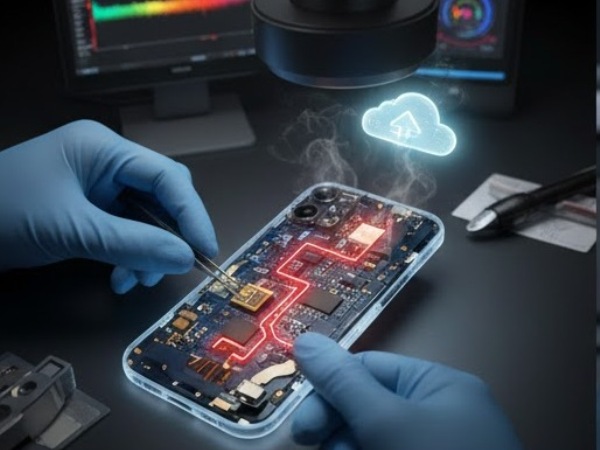
Before we dive into the “death” signs, it is important to understand what you’re dealing with. The motherboard is the “brain” of your iPhone. It houses the CPU, the NAND flash memory (where your photos and files live), the Wi-Fi chip, and thousands of microscopic capacitors and resistors.
Unlike a broken screen or a degraded battery—which are modular and easily replaced—the motherboard is a complex web of interconnected circuits. According to Wikipedia’s overview of Printed Circuit Boards, these boards use multiple layers to route data. If even one of these microscopic “traces” or a single capacitor shorts out, the entire device can become a “brick.”
2- Top Signs Your iPhone Motherboard is Dead or Dying
How do you know if you are facing a board-level issue rather than a simple hardware fix? Here are the most common symptoms:
The “No Sign of Life” Test
If your iPhone does not respond to a forced restart, does not show a charging icon when plugged in, and is not recognized by a Mac or PC, the power delivery system on the logic board likely has a short circuit.
Persistent Boot Loops
Does your phone show the Apple logo, turn off, and then repeat the process? While this can sometimes be a software glitch, it is frequently a sign that the logic board cannot communicate with the NAND storage chip or the CPU.
Sudden Hardware “Ghosting”
If your Wi-Fi toggle is greyed out, your cameras are black, or Face ID suddenly stops working without any physical damage, these are classic indicators of failing “ICs” (Integrated Circuits) on the motherboard.
Extreme Overheating
If your iPhone feels hot to the touch even when you aren’t using it, a component on the board is likely “leaking” current. This is often caused by water damage or a failing power management chip.
3- Common Causes of Motherboard Failure
Living in California, our devices are exposed to various environments that can trigger board issues:
- Physical Trauma: Even if your screen doesn’t crack, a drop on the pavement in San Francisco can dislodge microscopic solder balls under the CPU.
- Water Exposure: A quick dip in the Pacific or a spill at a local cafe can lead to corrosion. This “green mold” eats away at the copper traces on the board.
- Power Surges: Using cheap, non-MFi certified chargers can send a spike of voltage that “pops” the charging IC (Tristar chip).
- Heat Stress: Leaving your phone on a car dashboard during a heatwave can warp the multi-layered board.
4- Can You Recover Data from a Dead iPhone Motherboard?
The short answer is yes, but it is almost never a “do-it-yourself” job.
Because modern iPhones are encrypted, you cannot simply “pull the chip” and read the data like an old SD card. The CPU and the NAND storage chip are “married” to each other. To get your data back, the motherboard must be brought back to a functional state—at least temporarily.
The Professional Recovery Process:
- Microsoldering: Technicians use high-powered microscopes to find and replace shorted capacitors the size of a grain of sand.
- Board Splitting: For newer models (iPhone X and later), the motherboard is actually two boards sandwiched together. Experts must “split” them to find hidden damage.
- CPU/NAND Transplants: In extreme cases, if the original board is too damaged to repair, the critical chips are transplanted onto a “donor” board to facilitate a one-time backup.
Expert Note: Never attempt to “bake” your motherboard in an oven or use a hairdryer to fix it. These “internet myths” often cause irreversible damage to the sensitive solder joints, making professional iPhone data recovery impossible.
5- Why California Residents Choose Specialized Board Repair
In a state filled with “quick-fix” mall kiosks, motherboard repair stands apart. Most standard repair shops only do “parts swapping”—they replace screens and batteries. When they see a dead board, they typically tell the customer it’s “unfixable.”
True experts, like those found at Phonebulance, specialize in component-level repair. This involves diagnosing the specific electrical rail that has failed. If you have years of family photos or critical business documents that aren’t backed up to iCloud, this specialized path is your only hope.
6-Frequently Asked Questions (FAQ)
How much does iPhone motherboard repair cost in California?
Professional motherboard repair for data recovery typically ranges from $300 to $800, depending on the model and the complexity of the damage. While this is more than a screen repair, it is often the only way to retrieve irreplaceable data.
Is it worth fixing a dead motherboard or should I just buy a new phone?
If you have a recent backup and don’t care about the data, it is usually more cost-effective to replace the device. However, if you need your data, or if the phone is a newer model (like an iPhone 15 or 16), a motherboard repair can save you hundreds compared to buying new.
Can Apple fix my motherboard?
Generally, no. Apple’s standard procedure for motherboard failure is a “Whole Unit Replacement.” They do not perform microsoldering and they do not offer data recovery services. If you want your photos back, you must go to an independent specialist.
Will my data be safe during the repair?
When working with reputable technicians, your data remains encrypted and private. The goal of the repair is to allow the phone to boot so you can enter your passcode and perform a full backup.
Conclusion: Don’t Lose Hope for Your Data
A dead iPhone motherboard is a serious problem, but it isn’t a death sentence for your data. By recognizing the signs—such as no power, boot loops, or overheating—you can take the right steps before the damage becomes permanent. Remember: the first attempt at data recovery is often the most successful, so avoid DIY “hacks” and stick to the pros.
If you’re in California and your iPhone has gone dark, don’t let your memories disappear with it. Our team specializes in the complex microsoldering required to bring dead iPhones back to life.
Ready to get your data back? Make appointment today for a professional diagnosis and expert motherboard recovery services.
 Phonebulance is your one-stop centerWant to get the most out of your iPhone? At Phonebulance, we’re your one-stop center for all things smartphone! Whether you’ve cracked your screen, dropped it in water, or it’s simply acting sluggish, our certified technicians can diagnose and fix a wide range of issues. Contact us today or make an online appointment to learn more about our services and keep your smartphone connected and functioning like new!Here is the list of our smartphone repair services:
- Apple iPhone
- Apple Watch
- Apple iPad
- Apple iPod
- Samsung Galaxy S Series
- Samsung Galaxy Note Series Samsung Galaxy Tab
- Google Pixel and Nexus
- OnePlus
- Other brands (LG, Motorola, HTC, Blackberry…)
Here is the list of our repair and fixing prices:
- iPhone LCD Screen Replacement
- iPhone Charging Port Replacement
- iPhone Battery Replacement (High Capacity)
- iPad screen replacement
- iPhone Back Camera Lens Replacement
- iPhone Rear Camera Repair
- iPhone Back Glass Repair Cost
Service Areas in Orange County South:
0 Comments